
en
Already have a crypto wallet? You can import it to KriptoK using your existing seed phrase. Here's how. Learn the key concepts, practical steps and risks to.
Download and open the KriptoK app. On the welcome screen, tap Import an existing wallet.
You'll see two fields:
Wallet Name (optional): Give your wallet a name for easy identification, like "Main Wallet."
Import seed phrase (required): Enter your 12 or 24 words in the exact order they appear in your backup.
You can type them manually or tap Paste if you have them copied.
Note: Words should be separated by single spaces. KriptoK accepts 12, 18, or 24-word phrases.
Create a 6-digit PIN to secure the app on this device. This is different from your seed phrase - it just protects access to the app.
Re-enter your PIN to confirm.
Choose whether to enable Face ID or Touch ID for quick access.
You can:
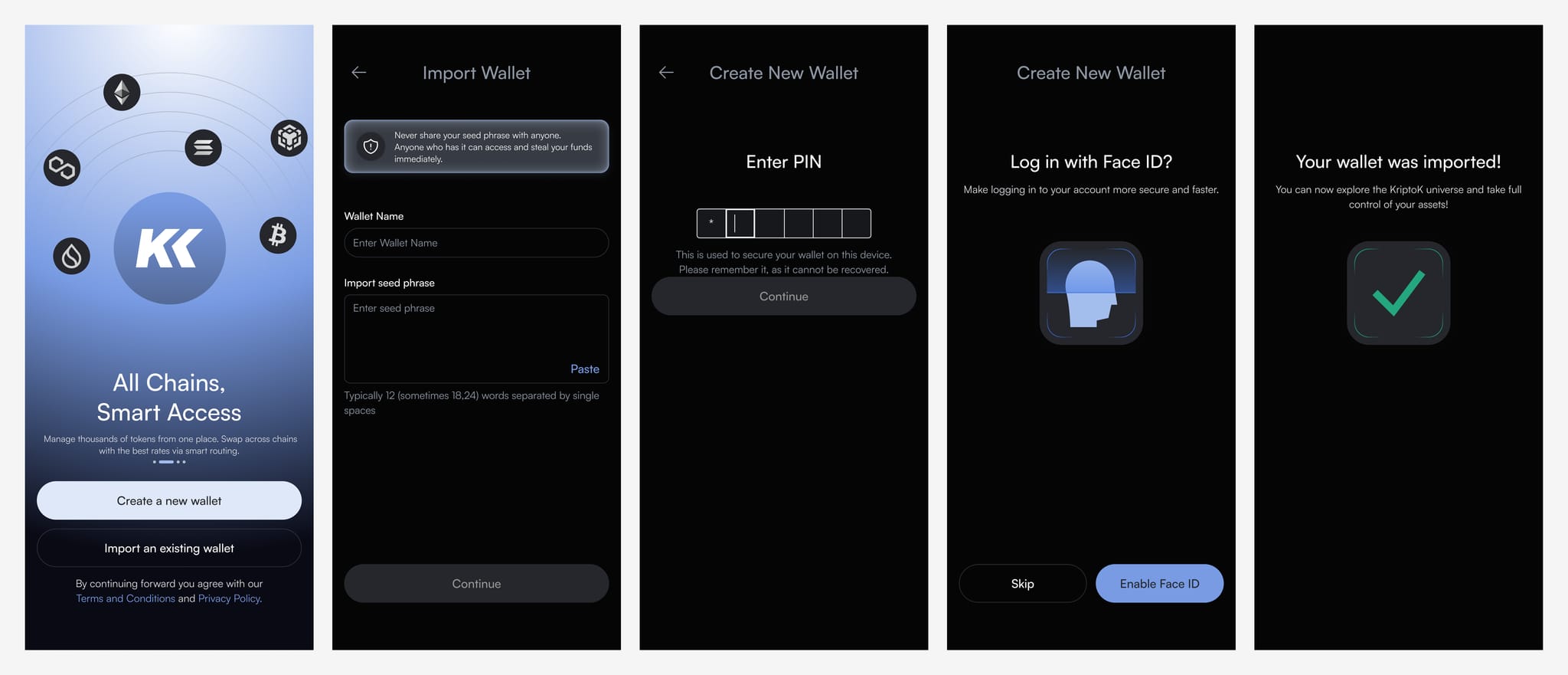
You'll see: "Your wallet was imported!"
Your wallet is now accessible in KriptoK with all your existing crypto. You can explore the KriptoK interface and take full control of your assets.
Your crypto doesn't move. It stays on the blockchain. Both your old wallet app and KriptoK can access the same funds because they use the same seed phrase.
If you want to stop using your old wallet, you can delete the app. Your crypto remains accessible through KriptoK.
Q: Can I import wallets from MetaMask, Trust Wallet, or other apps?
A: Yes. Any wallet that uses a standard 12 or 24-word seed phrase (BIP-39) can be imported to KriptoK.
Q: What if I enter the wrong seed phrase?
A: KriptoK will either show an error or import a different (empty) wallet. If your balances don't appear, double-check your seed phrase and try again.