
en
Your crypto exists on the blockchain, not in your phone. Your wallet app is just the key to access it. If your phone is lost or broken, your backup is the.
Your crypto exists on the blockchain, not in your phone. Your wallet app is just the key to access it. If your phone is lost or broken, your backup is the only way to recover your funds.
If your device is lost and you have no usable backup or other recovery method, access to the wallet may be permanently lost.
When you back up your wallet, you're backing up your seed phrase - the recovery words that can restore your keys in a compatible wallet.
This isn't backing up the app. It's backing up the access key.
Open KriptoK and you'll see a reminder: "Secure your wallet - Save your seed phrase securely away"
Tap this to begin the backup process.
KriptoK will ask you to enter your PIN or use Face ID/Touch ID to verify it's you.
Before showing your seed phrase, KriptoK displays important information:
Read these carefully. Check the boxes to confirm you understand.
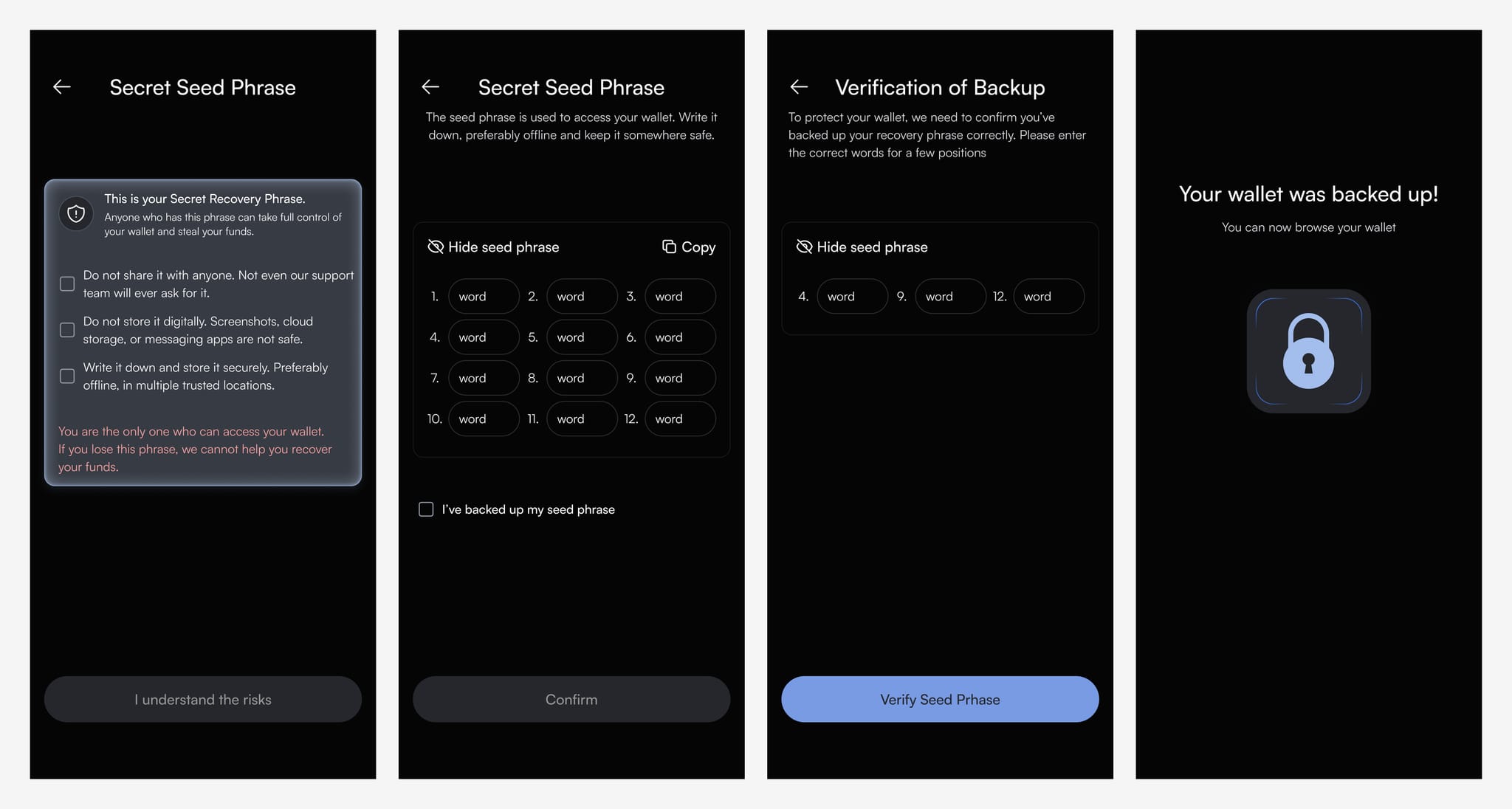
Tap Show seed phrase. KriptoK displays your 12 words, numbered 1-12.
Store these words safely in a secure location.
Never:
After viewing your seed phrase, tap Confirm.
KriptoK will ask you to select specific words from your backup (e.g., "Select word #4" and "Select word #9").
This ensures you've stored it correctly.
Once verified, you'll see: "Your wallet was backed up!"
Your recovery phrase has now been verified. Keep it protected because anyone who obtains it may be able to control the associated assets.
If you lose your phone or need to access your wallet on a new device:
Q: Can I skip the backup?
A: You can, but if you lose your device, your crypto cannot be recovered. Always create a backup.
Q: What if I already created my wallet but didn't back up?
A: Follow these same steps. The security reminder will remain until you complete the backup.
Q: Can I back up to iCloud or Google Drive?
A: KriptoK recommends keeping the recovery phrase offline and out of cloud storage, screenshots, email, and notes apps. Choose a storage method that protects against both unauthorized access and physical loss.